Nube

cloud lampESP32-S324 pixelsYeelight LANcustom PCBopen source

My daughter has an IKEA cloud lamp on her wall. The problem was never that it was boring: it was too bright, one shade of white, and the only way to change anything was to reach up and touch it. I opened it, and inside were 24 V and IKEA's own proprietary connector — there to discourage exactly this, I assume. That one detail decided the whole project: I was never going to dim it, I was going to replace everything behind the diffuser.
status
on the wall, working
control
her iPad · Home Assistant
stack
ESP32-S3 · WS2812 · KiCad · Arduino
built with
Claude Code · KiCad MCP
licence
open, all on GitHub
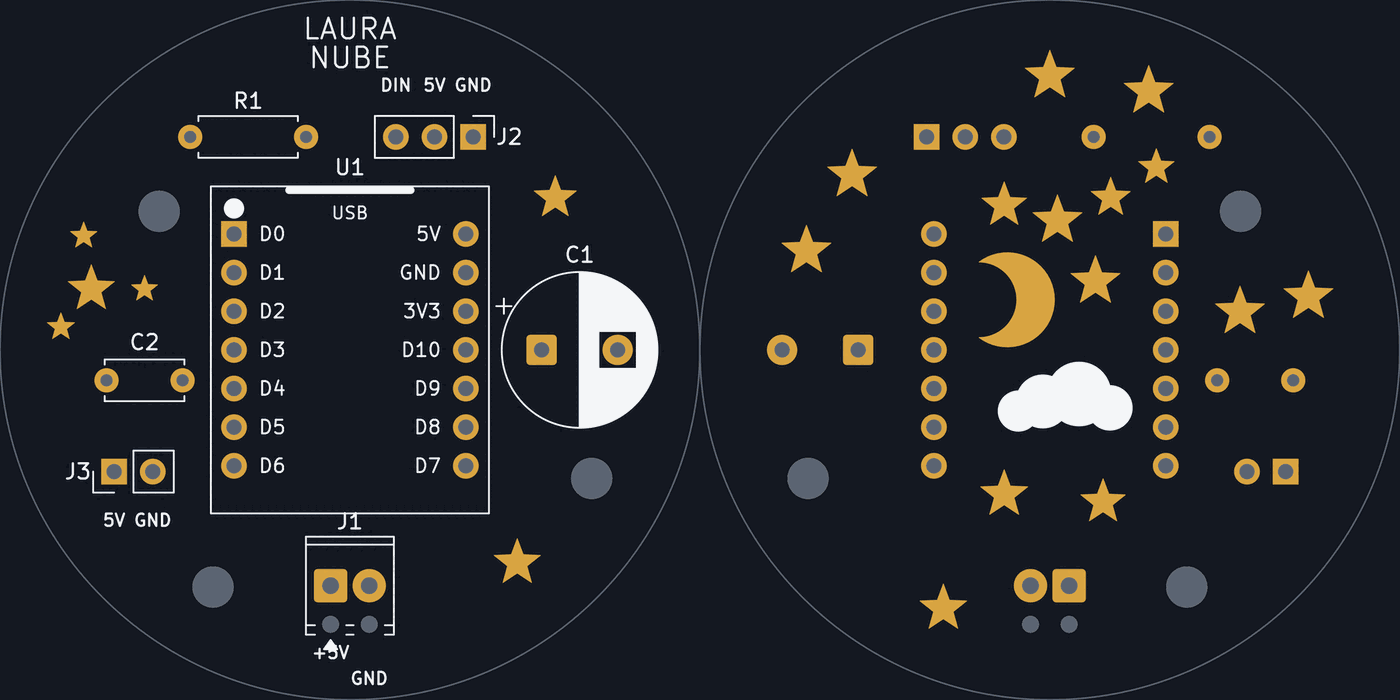
The 46 mm carrier board, front and back: the module socket with its pinout, and a moon, a cloud and fourteen stars in the soldermask

The actual board, front and back. The back is not printed: the moon, the cloud and the stars are openings in the soldermask, and what shows through them is the copper.

46millimetres across — a disc barely bigger than the module it carries
24addressable pixels on a single data wire
4 KBthe entire control page, gzipped into the firmware
0accounts, clouds and app stores between her and her lamp
Six minutes, start to finish

The why, the how, what did not work, and the part I did not expect to enjoy: making it a proper board.

Why a lamp

The problem

One white, too bright

It did exactly one thing, and at bedtime it went straight into her face. To change anything you had to reach up and touch it.

The reason

She already thinks this is how lamps work

She watches us change the colour of a lamp from a phone, and to her that is not technology: it is simply what lamps do. So she should have one she can change herself — and find out, while she is at it, that the inside of a thing is not sealed. You are allowed to open it.

The decision

Not dim it: replace it

Inside: 24 V and a connector shaped so that nothing else fits. Adapting to it made no sense, so I took out everything behind the diffuser and put in a microcontroller and a ring of 24 pixels.

Now

A URL on her iPad

She picks the colour. No account, no app, no cloud. And the lamp also answers to Home Assistant, because it speaks a protocol the house already understands.

Four decisions that hold up everything else

01

The protocol first

It answers like a Yeelight bulb on the local network, so the house already knows what it is. Committing to that shape on day one meant the light's behaviour was already decided: I never had to invent it.

02

The light and the protocol, apart

One file holds state, fades, gamma and what survives a power cut — and it does not know what a Yeelight is. That separation is the only architectural decision worth making here.

03

The interface lives inside the lamp

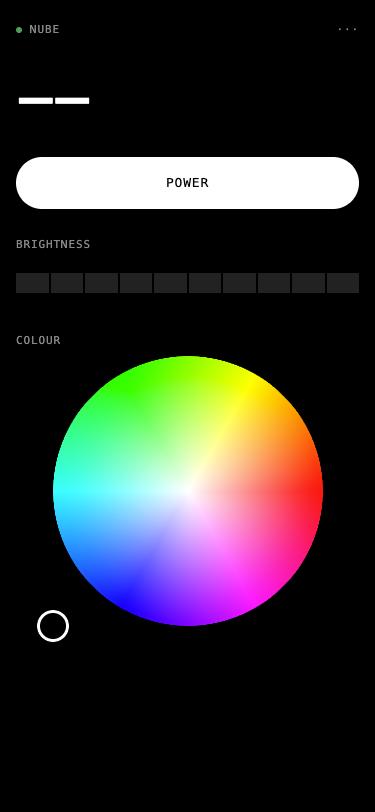
The control page is served by the lamp itself: under 4 KB, gzipped into the firmware. I put the URL on her iPad and that was it. Nothing to install, nothing to keep alive.

04

IKEA had already done half of it

The diffuser is the hard part and it already existed. Keeping the case turned something headed for a donation box — or worse, a bin — into the one part I did not have to make.

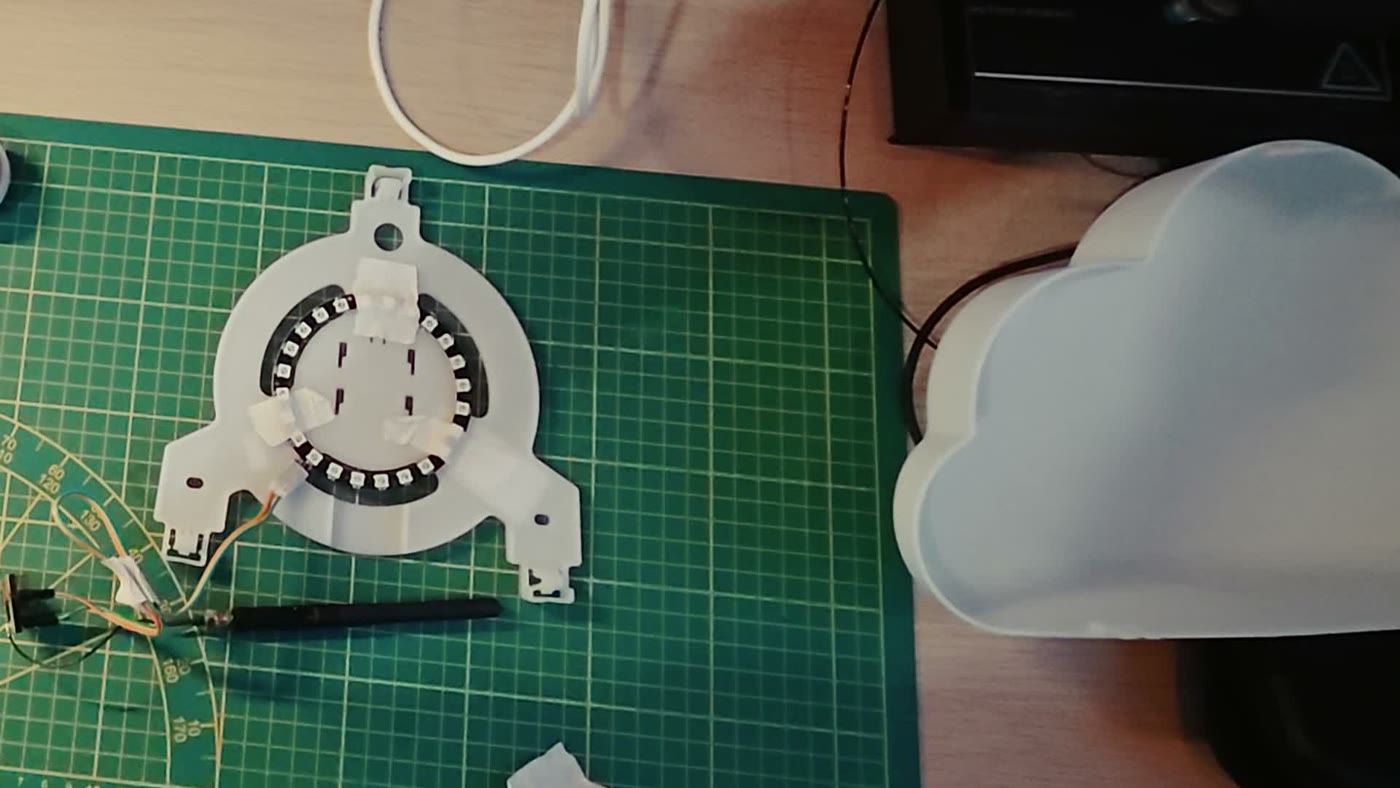
The prototype: the LED ring on a 3D-printed carrier with jumper wires, next to the original cloud diffuser
the prototypeMasking tape and loose wires. It worked for weeks.
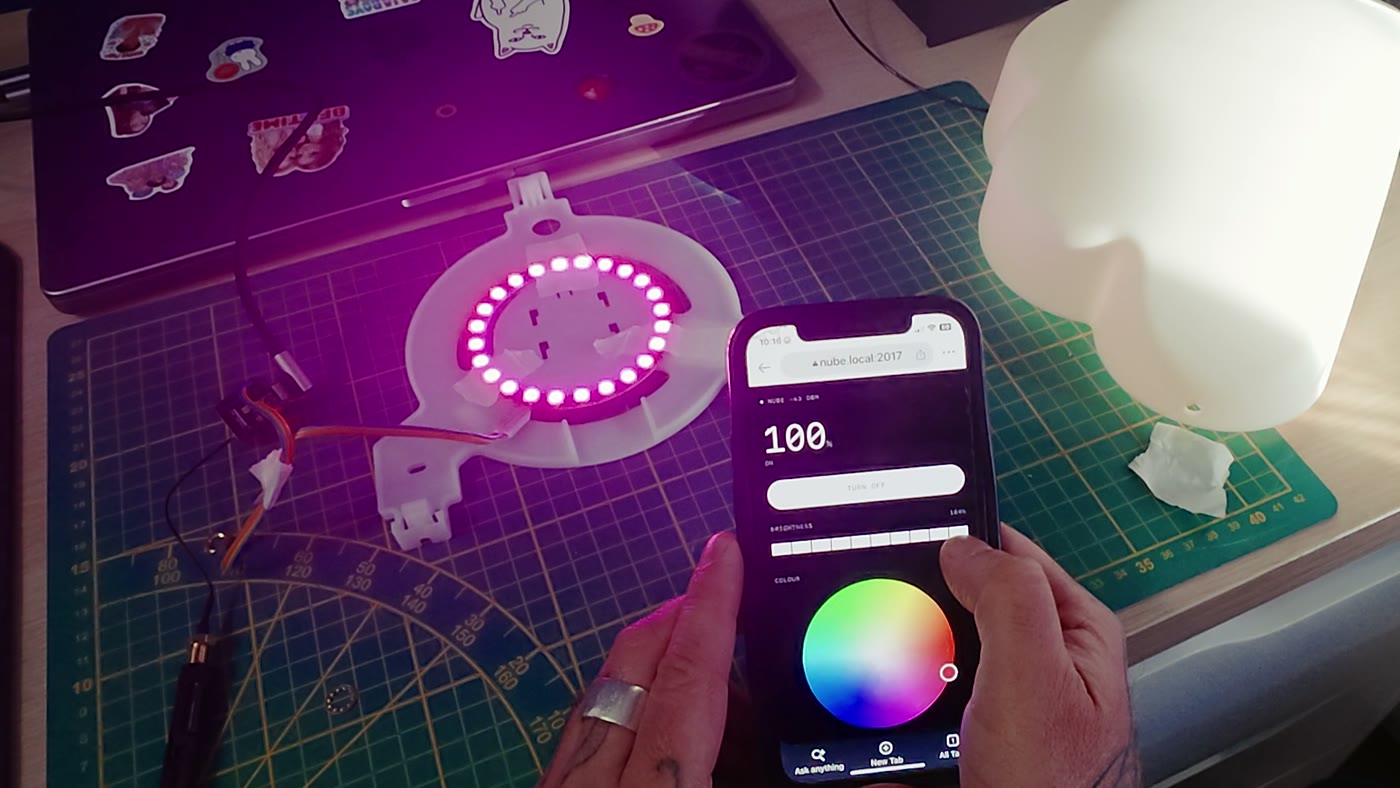
The ring lit magenta on the bench while a phone shows the lamp's own control page with a colour wheel
the testThe ring obeying the page the lamp itself serves.
The control page served by the lamp: power, a brightness bar in one-unit steps, and a colour wheel
the interfaceThe whole interface fits in under 4 KB gzipped.

The part I did not expect to enjoy

The loose wires outgrew the masking tape, so I made it a board. I did not draw it: I described it, and three scripts wrote it. In 2026 that is no longer the wall it used to be — KiCad is free, the factory is a website, and the part that used to stop people, knowing where everything actually goes, you can now talk your way through.

Generated, not drawn

One script places the parts, one lays the tracks, one draws the artwork. All three would rather tell me something sits two tenths of a millimetre too close than write the file. I never dragged a single footprint.

Measured, not guessed

The module footprint comes from the manufacturer's own dimensioned DXF, not from an image search. Every part is measured against the others before anything is written.

The module sits in a socket

So the board never costs you the microcontroller. And the pinout is printed inside the socket, which is exactly where you need it: with the module out.

The artwork is not ink

The moon, the cloud and the fourteen stars are openings in the soldermask. What shows through is the copper with an ENIG finish. Three colours, and only one of them is ink.

What the exercise actually taught me is not that the automated checks are enough. KiCad's DRC passed clean with 49 stacked shapes in the soldermask, because the DRC does not check the mask. What found the mistakes was looking.

Watch it, copy it

Everything is on GitHub: the firmware, the web UI, the KiCad scripts that generate and check the board, and the fabrication files.

Built with Claude Code and the KiCad MCP. The idea, the taste and every decision are mine; the firmware, the board scripts and the video were produced together with the AI tools. The video's narration is Gemini TTS, and the video itself is made with HyperFrames.