Signal Interference

TouchDesignerStreamDiffusionDaydreamAbleton LiveMIDIOSC

Jaime Levy is an artist and educator in Berlin who performs live with TV signals as TVOD. She needed an instrument for it: something that takes live television and makes it playable. Signal Interference is the proof of concept I built. Over-the-air TV goes into TouchDesigner, an AI model in the cloud reimagines it in real time, and a small MIDI controller and an iPad play the picture and the sound like an instrument.

status
performed live, Berlin, January 2026
with
Jaime Levy · Berlin
my role
system design, real-time AI & a custom Ableton script
stack
TouchDesigner · StreamDiffusion · Ableton · Python · OSC
permission
shared with her approval
Signal Interference signal flow An antenna feeds a DVB-T2 receiver, then an Elgato capture card, then a MacBook running TouchDesigner with StreamDiffusion calling Daydream in the cloud, then a projector. The capture card also feeds a monitor with the untouched signal. A MIDI controller and an iPad control the MacBook. TV audio goes to Ableton Live on the same MacBook, then to speakers. TV signalantenna → DVB-T2 Capture cardElgato · HDMI in MacBookTouchDesigner Projectorthe processed picture Monitoruntouched TV MiniLab 3 · iPadMIDI · OSC Daydreamcloud GPU · API Ableton Live → PAsampled TV audio picture audio

The whole flow. A real signal comes in on the left, the processed picture goes out to the projector, and the audio from the same signal takes its own road into Ableton. A second monitor shows the untouched TV, so you can see where it all comes from.

4weeks, ten hours a week, for the whole proof of concept
0local GPUs: the AI runs in the cloud and the MacBook only conducts
13controls mapped: 5 knobs, 7 pads and an encoder
2screens: one with the AI, one with the untouched broadcast

See her playing it

TVOD, the performance project of Jaime Levy and Terry Russell, played at the Vorspiel series in Berlin in January 2026: a live improvisation that hijacks and reprocesses terrestrial TV signals in real time, with distorted audio loops and AI-infused video projections. This is the proof of concept, in her hands.

Video by Jaime Levy, with camera work by Luna Paluck Teeter. In the description, Jaime credits me with building the rig. I was not on stage: I built it, handed it over and ran the workshop.

The sound half, in a test session

An early test session from December: Ableton Live recording and replaying clips from the MiniLab 3, without touching the mouse. My hands are in the corner. The audio in this take is quiet, so turn it up.

An instrument, not a video

The ask

Sample the TV, live, twice

Jaime did not want a finished video to press play on. She wanted the broadcast itself as raw material, sampled live. One signal, two samplers at once: the picture goes through AI and TouchDesigner effects, while the sound is sampled from the same TV in Ableton Live with a controller, so she can bend both live on stage.

The limit

Four weeks and no GPU

Ten hours a week, an M-series MacBook, and a hard line: no local AI inference. Anything heavy had to run somewhere else, which is how Daydream ended up doing the generating while the laptop did the conducting.

The decision

Let each tool do what it is good at

TouchDesigner is powerful with pictures and awkward with sound. Ableton Live is the reverse. So I did not force one to behave like the other: TouchDesigner drives the visuals, Ableton handles the audio, and MIDI links them.

Now

Handed over in Berlin

I went to Berlin to hand her the instrument and run a 24-hour workshop on how to play it live. It came with documentation, a quickstart guide and tutorial videos, and I stayed on for the support it needed. The goal was modest on purpose: prove the workflow and the interaction. In January she played it on stage at Vorspiel.

Four pieces that hold up the performance

01

A real signal in

An indoor antenna feeds a DVB-T2 receiver, which sends HDMI to an Elgato capture card. TouchDesigner sees live broadcast TV as just another video device. The same signal also passes through, untouched, to a second monitor.

02

The AI lives in the cloud

StreamDiffusion runs inside TouchDesigner, but the heavy lifting goes to Daydream through its API. I tested styles there first, with prompts like “soft poetic static” and “TV signal dissolving into color”, then rebuilt the best ones live, mixed with classic feedback and displacement.

03

Sound you can cue in private

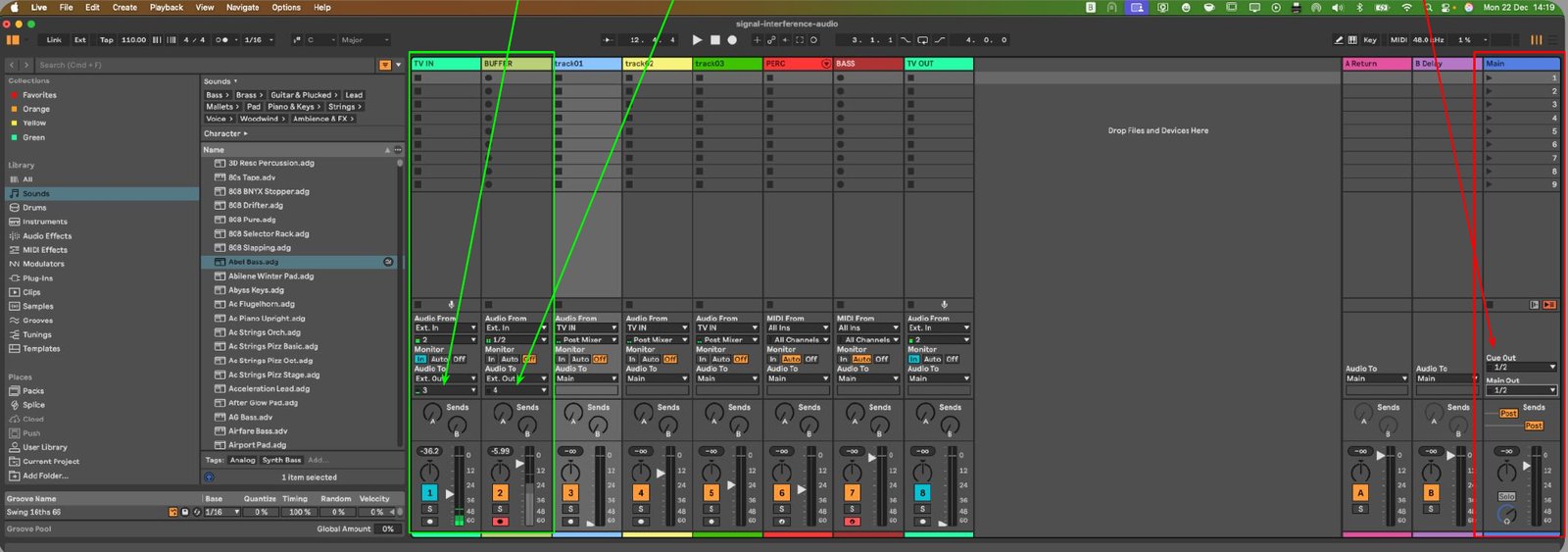
Ableton Live samples the TV audio while the picture is being processed. TV IN and BUFFER go to headphones only, so she can cue, record and cut samples without the audience hearing, and only the performance tracks reach the main mix. To make it easy on the MiniLab I wrote a control script for Ableton, in Python: the pads record and play the buffer, and my script moves and deletes clips from the controller, so the sampling loop never needs the mouse.

04

One controller, colour-coded

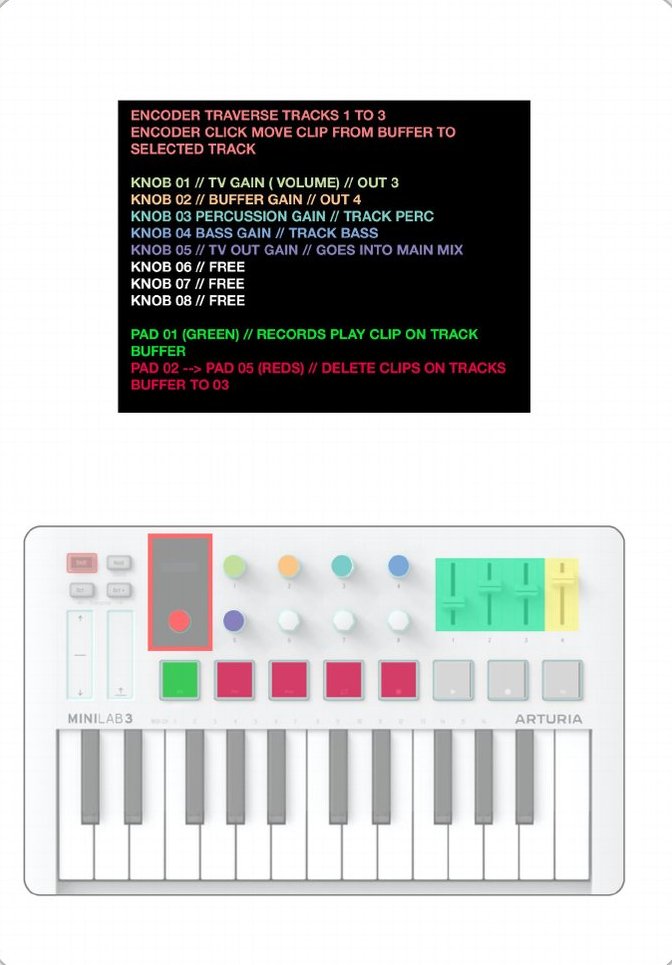
The MiniLab 3 is mapped so nobody has to guess: green plays and records, red deletes. An encoder walks through the tracks, the knobs set gain for the TV, the buffer, the percussion and the bass. The colours are a saved preset, so the pads tell you what they do.
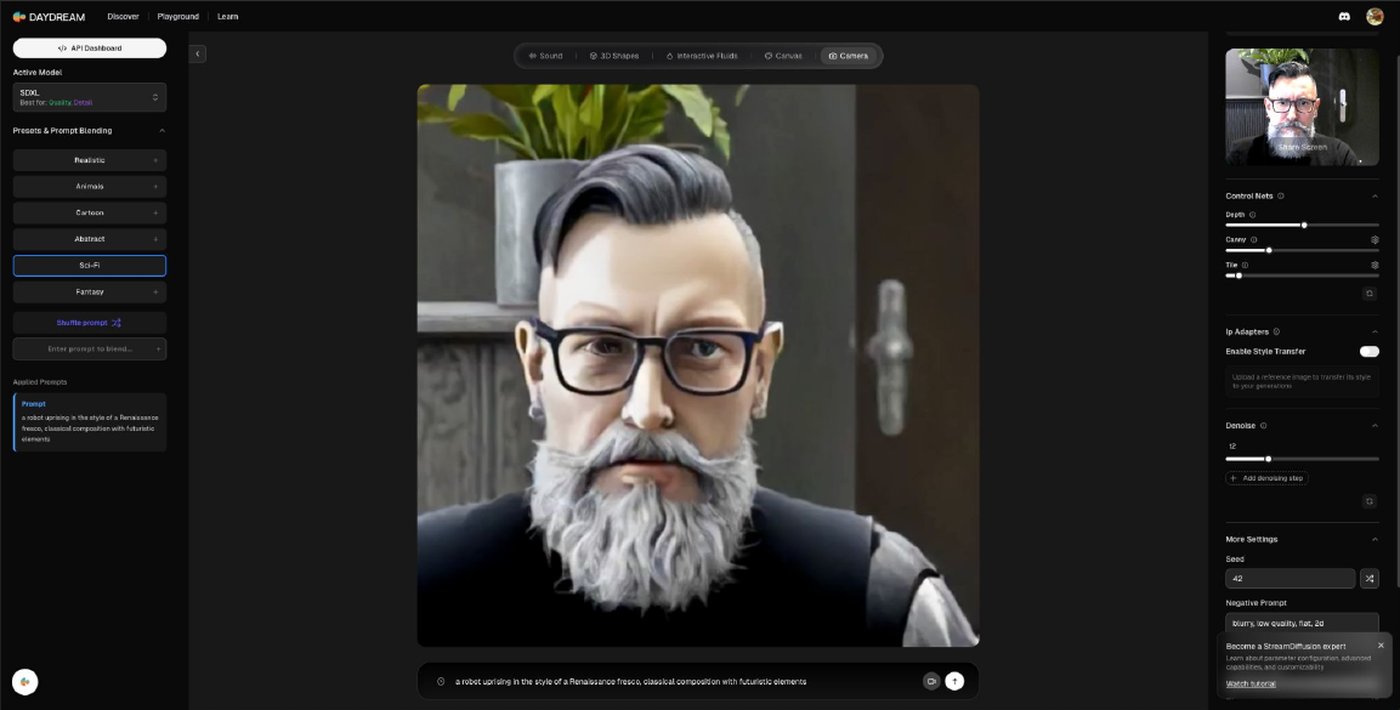
Daydream playground showing a webcam portrait of Luis restyled by StreamDiffusion into a painterly sci-fi portrait
the testDaydream’s playground, with my own webcam as the input. This is where styles were tried before going into TouchDesigner.
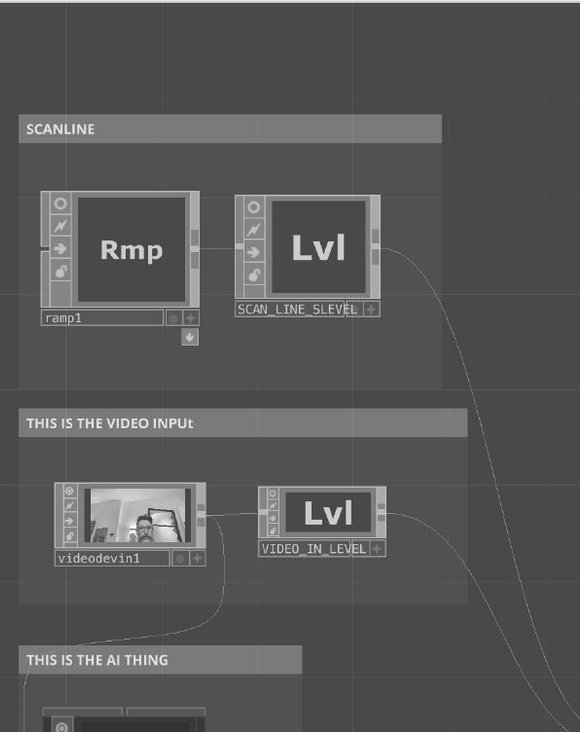
A TouchDesigner network with groups labelled scanline, the video input and the AI thing
the patchInside TouchDesigner: a scanline for the TV look, the video input, and the group where the AI operator lives.
The MiniLab 3 controller map: encoder, five knobs and seven pads with colour-coded functions
the mapEvery control on one printable A4. Green means play and record, red means delete.
Ableton Live session with TV IN and BUFFER tracks routed to headphone outputs 3 and 4, and the performance tracks routed to Main
the routingTV IN and BUFFER leave on outputs 3 and 4, to the headphones. The performance tracks go to Main, and Main goes to the speakers.

A second controller, over WiFi

On top of the MiniLab, I made an iPad able to play TouchDesigner too. There is no app: it is a web page that talks to the Mac.

01

A small server on the Mac

A Flask and Socket.IO server prints a QR code in the Terminal. She scans it with the iPad camera, on the same WiFi, and the controller opens. The server comes first, always, and the instructions say so in bold.

02

OSC into TouchDesigner

Inside the project there is a group called WebSocket Connection, already wired. Once the server, the iPad and TouchDesigner are connected, the sliders on the iPad move the AI operator directly. A TouchOSC layout covers the same ground as a fallback.

What it does and does not do

What it does

One live broadcast, one MIDI controller and an iPad, working together in real time. AI restyles the picture, classic effects like feedback and displacement give it texture, and the sampled audio is routed back into TouchDesigner so the visuals can react to it.

What it does not

No local AI inference and no heavy GPU work. No advanced techniques in either program, and no production-level polish. A custom cloud GPU setup could come later, but it would need more engineering time and rented hardware. The point was to prove the workflow.

Most of the hard work was making it safe to touch

An update that broke the mapping

A failed update left Stop and Delete locked. I rolled the code back, rewrote the controller script and the colour scheme, and recorded a video tutorial for mapping by hand in case it happened again.

An environment I could not see

Python’s SSL module failed on the performer’s machine, in an environment I could not see. It took an emergency video call to fix. The install guide now ends with a troubleshooting section, so the next person starts with that.

A free cloud has a mood

Daydream is free to use, so its capacity comes and goes. I set up a way to switch between API keys when one of them throttled, and wrote down the four steps to do it, so a bad moment in the cloud would not stop a rehearsal.

Wireless is a risk

For live use, everything audio is wired: a capture-style input, a separate output interface, a small buffer size. Wireless adds delay and can drop. The settings are in the guide, because the first time it matters is on stage.

What the exercise leaves me with: the AI was the showy part, but most of the hours after delivery went into what makes it truly playable. The pad colours, a delete button that does not fail, and the install notes.

Talk to me about it

This was a collaboration with an artist, so the code and project files stay with her. If you are building something similar, with TV, real-time AI or an instrument, I would be happy to talk.

A collaboration with Jaime Levy, shared with her approval. The visual AI runs on Daydream (StreamDiffusion) and the audio on Ableton Live. The system design, the taste and every technical decision are mine.